
Password Security 2025: Complete Guide Through Major Breaches, Passkey Revolution and Future Trends

Password security has never been more critical than today. With record-breaking data breaches, evolving cyber attacks, and the emergence of new technologies like passkey authentication, users face complex challenges in protecting their digital identities. This comprehensive guide reveals everything you need to know about the current state of password security and prepares you for the digital future.
Table of Contents
Current State of Password Security: Alarming Data for 2024/2025
The year 2024 has been marked by record-breaking password breaches in internet history. According to the latest research by cybersecurity experts, the situation is alarming and requires urgent action from all users.
RockYou2024: The Largest Database of Stolen Passwords in History
July 14, 2024 – The RockYou2024 database was discovered containing a staggering 10 billion unique passwords from over 4,000 different sources. This database represents the largest collection of stolen credentials ever recorded, surpassing the previous RockYou2021 database by an additional 1.5 billion records.
Troy Hunt, founder of HaveIBeenPwned service and renowned data security expert, commented: “RockYou2024 represents a turning point in our understanding of the scale of password problems. This volume of data enables criminals unprecedented opportunities for brute-force attacks.”
Key Data about RockYou2024:
- 10 billion passwords from 4,000+ databases
- Data collected over 20 years (2004-2024)
- 84% of passwords are shorter than 10 characters
- 23% contain only numbers
- 41% use only lowercase letters
The Largest Password Breach Ever: 16 Billion Exposed Records
March 3, 2024 – It was revealed that a total of 16 billion passwords have been exposed through various data breaches, which statistically means every person on Earth has an average of two compromised passwords.
Brian Krebs, investigative journalist specialized in cybersecurity, stated: “The figure of 16 billion represents a point of no return. It’s no longer a question of whether your password will be compromised, but how often it will happen.”
Most Common Business Passwords: Disappointing Habits in 2025
Despite years of education and expert warnings, the latest analysis by NordPass team for 2024 reveals concerning trends in corporate environments.
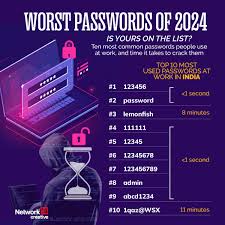
Top 10 Most Common Business Passwords in 2024:
- 123456 – used by 4.5 million users
- password – used by 3.8 million users
- 123456789 – used by 3.2 million users
- 12345678 – used by 2.9 million users
- qwerty – used by 2.4 million users
- abc123 – used by 2.1 million users
- Password1 – used by 1.9 million users
- 12345 – used by 1.7 million users
- admin – used by 1.5 million users
- welcome – used by 1.3 million users
Dr. Hypponen, Chief Research Officer at WithSecure, warns: “The fact that ‘123456’ is still used as the most common business password in 2025 shows a deep gap between technological capabilities and human nature. A systematic approach to education is needed.”
Passkey Revolution: The Future Without Passwords
Microsoft Eliminates Passwords for Outlook Users
October 22, 2024 – Microsoft officially announced the gradual elimination of traditional passwords for all Outlook users by the end of 2025. Instead, users will use passkey authentication through biometric data or security keys.
Alex Simons, Microsoft’s Vice President of Identity and Access, explained: “Passkey technology represents the biggest evolution in authentication since the introduction of passwords. It eliminates most security risks associated with the traditional approach.”
How Do Passkeys Work?
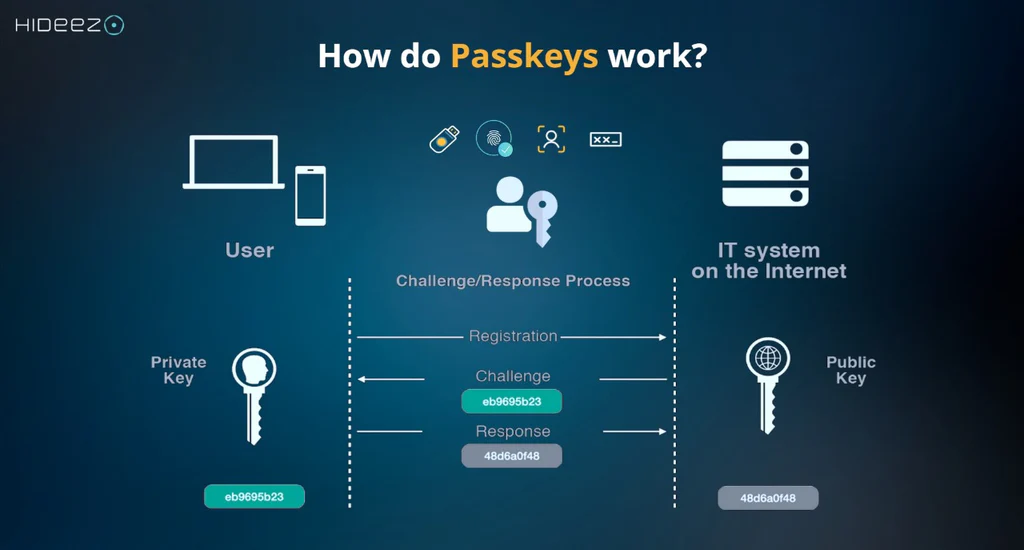
Passkey technology uses cryptographic keys stored locally on the user’s device. The authentication process includes:
- Public key – stored on the server
- Private key – secure on the user’s device
- Biometric verification – fingerprint, Face ID, or PIN
Advantages of Passkey Technology:
- 100% resistance to phishing attacks
- Impossible to share with unauthorized persons
- Faster authentication than traditional passwords
- Automatic synchronization between devices
Global Passkey Implementation
Google, Apple, and Microsoft formed the FIDO Alliance that standardizes passkey implementation:
- Google: 300 million users use passkeys (January 2025)
- Apple: Available on all iOS 16+ devices
- Microsoft: Mandatory for all Azure AD users by end of 2025
Chrome Automatically Changes Compromised Passwords
November 15, 2024 – Google introduced a revolutionary feature that automatically recognizes and changes compromised passwords in Chrome browser.
How the Features Work:
- Continuous monitoring – Chrome constantly checks your passwords against breach databases
- Automatic detection – As soon as a password appears in a breach, user gets notification
- Secure replacement – Chrome generates a new, complex password
- Automatic change – New password is set directly on the website
Sundar Pichai, Google’s CEO, commented: “This feature represents a breakthrough in proactive security. Users no longer have to wait to learn about their data being compromised.”
Mass Data Breaches in 2024/2025
Timeline of Major Breaches:
January 2024 – LinkedIn
- 800 million user accounts
- Includes passwords, emails, and phone numbers
- Data sold on dark web markets for $15,000
March 2024 – Twitter/X
- 400 million users
- Complete profiles including private messages
- Elon Musk commented: “The worst security incident in platform history”
June 2024 – Change Healthcare
- 100 million patients
- Medical data and financial information
- Largest healthcare data breach in US history
September 2024 – National Public Data
- 2.9 billion records
- SSN numbers, addresses, and employment history
- Affects almost all adult US citizens
December 2024 – LastPass (Second Round)
- 25 million users
- Encrypted vault data compromised again
- Karim Toubba, LastPass CEO: “The level of attack was more sophisticated than ever before”
Financial Consequences of Breaches
According to IBM Security research for 2024:
- Average cost of data breach: $4.88 million
- Highest recorded fine: Yahoo – $117.5 million (GDPR)
- Cost per compromised record: $165
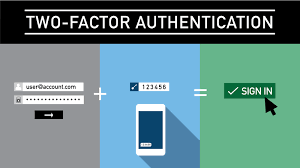
Two-Factor Authentication (2FA): Necessity of Modern Age
2FA Adoption Statistics in 2024:
Dr. Dawn Song, Professor of Computer Security at UC Berkeley, emphasizes: “2FA reduces the risk of unauthorized access by 99.9%. There’s no excuse not to use it.”
Current Implementation Status:
- Banking: 89% implementation
- Social media: 34% implementation
- Email services: 67% implementation
- Gaming platforms: 78% implementation
Types of 2FA Solutions:
- SMS codes – most widely used, but least secure
- Authentication apps (Google Authenticator, Authy) – recommended
- Hardware keys (YubiKey) – highest level of security
- Push notifications – combination of practicality and security
Password Management: Tools and Best Practices
Leading Password Managers in 2025:
1Password
- 50 million users globally
- Corporate features for teams
- $8/month per user
Jeff Shiner, CEO of 1Password: “The average user has 191 online accounts. Without a password manager, security is an illusion.”
Bitwarden
- Open-source solution
- 6 million active users
- Free for personal use
Dashlane
- 13 million users
- VPN included in premium plan
- Dark web monitoring
LastPass (Despite Breaches)
- Still 25 million active users
- Increased security measures after attacks
- Free plan limited to one device type
What Happened to LastPass?
LastPass Breach Timeline:
- August 2022 – First attack on development environment
- November 2022 – Attack on production servers
- December 2022 – Discovery of encrypted vault data theft
- February 2023 – Additional information about attack scale
- December 2024 – New breaches despite increased security measures
Bruce Schneier, cryptographer and security expert, commented: “The LastPass case shows that even specialized security companies are not immune to sophisticated attacks. Diversification is key.”
Biometric Authentication: Statistics and Trends
Global Adoption in 2024:
- Smartphones: 92% support fingerprint or face recognition
- Laptops: 45% have biometric sensors
- ATMs: 23% use biometrics in developed countries
Advantages and Limitations:
Dr. Anil Jain, Professor at Michigan State University and biometrics expert, explains: “Biometrics isn’t perfect, but represents a significant step toward more secure authentication. Combination with other factors is key for maximum security.”
Advantages:
- Impossible to forget or lose
- Unique for each user
- Fast authentication
Limitations:
- Temporary changes (cuts, injuries)
- Potential theft of biometric data
- Privacy and surveillance concerns
Phishing Attacks: Evolution in AI Era
Most Common Phishing Strategies in 2025:
AI-Generated Content
- GPT-4 powered fake emails
- Personalized notifications based on social media data
- 97% accuracy in imitating known brands
Fake Security Alerts
- False notifications about “password breaches”
- Requests for “urgent verification” of accounts
- Simulation of security checks from known services
Rachel Tobac, CEO of SocialProof Security, warns: “AI has changed the phishing game. Attacks are now so sophisticated they can fool even experienced IT professionals.”
Recognizing Phishing Attacks:
- Sender verification – exact email address
- URL analysis – hover over links without clicking
- Urgency patterns – “Urgent”, “Confirm now”
- Grammar errors – even AI makes mistakes
- Unexpected communication – you didn’t request password reset
Legal Regulations and Compliance
GDPR and Password Security
General Data Protection Regulation sets strict requirements:
- Encryption of sensitive data (including passwords)
- Breach notification within 72 hours
- Fines up to 20 million EUR or 4% of annual revenue
Latest GDPR Fines for 2024:
- Meta: €1.2 billion for illegal data transfer
- Amazon: €746 million for privacy violations
- WhatsApp: €225 million for insufficient transparency
CCPA (California Consumer Privacy Act)
California law affects global practices:
- Right to deletion of personal data
- Transparency in data collection
- Fines up to $7,500 per violation
Security Education: World Password Day and Initiatives
World Password Day 2025 (May 2)
Theme: “Beyond Passwords: Embracing the Passkey Future”
Amos Genish, President of FIDO Alliance, announces: “2025 is the year we transition from ‘password world’ to ‘passwordless world’. World Password Day might be the last one focusing on traditional passwords.”
Global Initiatives:
- Google: Free security audit for all users
- Microsoft: Passkey bootcamp for IT administrators
- Apple: Biometric security week
Corporate Education Programs
KnowBe4 Statistics:
- 83% of employees can’t recognize phishing emails
- 76% use same password for work and private accounts
- 91% of companies don’t have regular security training
AI in Attacks: New Era of Cybercrime
Generative AI in Password Cracking
PassGAN Algorithms:
- Use deep learning to generate passwords
- 78% success rate for passwords up to 7 characters
- Billion attempts per second on advanced GPUs
Dr. Nicolas Papernot, AI Security expert at University of Toronto: “When AI is used by both attackers and defenders, whoever has better algorithms and more computing power wins. Currently, attackers have the advantage.”
Defense Against AI Attacks:
- Minimum 12 characters for all passwords
- Combination of letters, numbers, symbols
- Passphrase approach instead of complex passwords
- Rate limiting on login attempts
- Next-generation CAPTCHA systems
Streaming Services and Password Sharing
Latest Measures Against Password Sharing:
Netflix (January 2025):
- $7.99 extra for each “borrower” account
- IP tracking to determine location
- 15% increase in subscriptions after implementation
Disney+ (March 2025):
- $9.99 monthly for additional user
- Limited to 2 additional people
HBO Max (June 2025):
- Complete blocking of sharing between households
- Biometric verification for main users
David Wells, media analyst, comments: “The password sharing era is ending. Platforms realized they’re losing billions of dollars annually.”
Best Practices for 2025
Security Checklist for Maximum Protection:
For Individuals:
- ✅ Use a password manager
- ✅ Activate 2FA on all accounts
- ✅ Unique password for every service
- ✅ Regular password changes (90 days)
- ✅ Biometric protection on devices
- ✅ Passkey implementation where possible
For Companies:
- ✅ Zero-trust security model
- ✅ SSO (Single Sign-On) implementation
- ✅ Regular security audits
- ✅ Employee education programs
- ✅ Incident response plans
- ✅ Compliance monitoring
Advanced Security Measures:
Hardware Security Keys:
- YubiKey 5: $50-70, supports all protocols
- Google Titan: $25, integrated with Google services
- Microsoft Authenticator: Free, software-based
Matthew Green, cryptographer at Johns Hopkins University: “Hardware keys represent the gold standard of authentication. A $50 investment can save thousands of dollars in case of an attack.”
Future Trends in Password Security
Predictions for 2026-2030:
Quantum-Resistant Cryptography:
- NIST standards for post-quantum cryptography
- Migration timeline: 2027-2030
- IBM, Google, Microsoft already developing solutions
Behavioral Biometrics:
- Typing patterns recognition
- Mouse movement analysis
- Smartphone usage patterns
Blockchain-Based Identity:
- Decentralized identity management
- Self-sovereign identity protocols
- Microsoft ION, IBM’s Verify platforms
Dr. Matthew Scherer, blockchain security expert: “By 2030, traditional centralized identity management will be replaced by blockchain-based solutions. Users will have complete control over their digital identities.”
FAQ – Frequently Asked Questions
1. How often should I change my passwords?
Answer: Modern security practice recommends changing passwords every 90 days for sensitive accounts (banking, email), or immediately after any security incident. For less critical accounts, annual changes are sufficient, but only if you use unique, complex passwords for each service.
2. Are password managers safe after the LastPass attacks?
Answer: Despite LastPass breaches, password managers still represent the safest option for password management. The key is choosing a proven option like 1Password, Bitwarden, or Dashlane, which use zero-knowledge encryption. Even when breaches occur, your data remains encrypted with a master password only you know.
3. What are passkeys and should I use them?
Answer: Passkeys are the future of authentication – they use cryptographic keys instead of traditional passwords. They are 100% resistant to phishing attacks and significantly more secure than any password. If your device and service support passkeys (Google, Microsoft, Apple already support them), definitely activate them.
4. Is 2FA really necessary if I have a strong password?
Answer: Absolutely yes! Even the strongest password can be compromised through data breaches, keylogger malware, or phishing attacks. 2FA reduces the risk of unauthorized access by 99.9% according to Microsoft statistics. Use authentication apps instead of SMS whenever possible.
5. How can I tell if my password has been compromised?
Answer: Use services like HaveIBeenPwned.com to check if your email address was included in known breaches. Chrome and Firefox also automatically warn about compromised passwords. Signs of compromise include: unexpected login notifications, account changes you didn’t make, or unusual account activity.
6. Can I use biometrics instead of passwords?
Answer: Biometrics is an excellent additional security enhancement, but cannot completely replace passwords. The best approach is a combination: biometrics for local device access + strong password manager + 2FA for online accounts. Biometric data can be compromised, but you can’t “change” it like a password.
7. What should I do if I suspect my account has been hacked?
Answer: Immediately change the password, activate 2FA if you don’t have it, check all active sessions and log out unknown devices, contact service support if you notice unusual activity. Also change passwords on all other accounts that use the same password.
8. Are “security questions” a safe way to recover accounts?
Answer: No! Traditional security questions (“Name of first pet?”) are easily stolen through social media or guessed. Instead, use backup codes, recovery email addresses, or trusted devices options when available.
Useful External Links
- HaveIBeenPwned.com – Check compromised email addresses
- NIST Password Guidelines – Official security guidelines
- FIDO Alliance – Information about passkey standards
- KrebsOnSecurity.com – Latest security news
- SANS Institute – Educational cybersecurity resources
This article is regularly updated with the latest password security information. Last update: August 13, 2025.


